
Silk Mobile
Table of Contents (Homepage)
- Overview
- Setting Up
- Getting Started
- How To
- Connecting Devices And Emulators
- Preparing Applications For Testing
- Managing Applications
- Recording Tests
- Working With Test Commands
- Adding Commands To Your Scripts
- Object Commands
- Click
- ClickCoordinate
- ClickIn
- ClickOffset
- Drag
- ElementGetProperty
- ElementGetTableRowsCount
- ElementListPick
- ElementListSelect
- ElementListVisible
- ElementScrollToTableRow
- ElementSendText
- ElementSetProperty
- ElementSwipe
- ElementSwipeWhileNotFound
- GetAllValues
- GetElementCount
- GetElementCountIn
- GetTextIn
- IsElementBlank
- IsElementFound
- IsFoundIn
- LongClick
- RunNativeAPICall
- SendWhileNotFound
- VerifyElementFound
- VerifyElementNotFound
- VerifyIn
- WaitForElement
- WaitForElementToVanish
- GetCoordinateColor
- DragDrop
- Application Commands
- Device Commands
- Web (Hybrid) Specific Commands
- Utilities Commands
- Monitoring Commands
- Configuration Commands
- ExtractLanguageFiles
- SetDefaultClickDownTime
- SetDefaultTimeOut
- SetDefaultWebView
- SetDragStartDelay
- SetInKeyDelay
- SetKeyToKeyDelay
- SetLanguage
- SetLanguagePropertiesFile
- SetShowImageInReport
- SetShowPassImageInReport
- SetShowReport
- SetSpeed
- SetThrowExceptionOnFail
- SetWebAutoScroll
- StartStepsGroup
- StopStepsGroup
- TextFilter
- Miscellaneous Commands
- Controlling Element Identification Rules
- Editing Test Objects
- Executing Test Scripts
- Report Of Executed Test
- Working From Code Environment
- Continuous Integration
- Layout Verification Tests
- Use Device Vitals Monitors
- Troubleshooting
- Terminology
Session 5 - Locating Application Elements
This session demonstrates two different ways to specify the location of an Element so that some action can be executed on it:
-
Example 1: "SwipeWhileNotFound" command - Swipe to search for an element or text.
-
Example 2: "ElementListSelect" command - Select an element in a list (after first making the element visible).
For this example we'll use the eri-Bank application. We will go to the payment page, click on the countries list, and choose United-Kingdom (which is the not visible unless scrolling down)
Preparations:
Step 1: We will do a native record on the eri-Bank application as explained in session 1 - "Getting Gtarted iOS / Android / WindowsPhone "
Step 2: Change the last command to "Click" on 'Make Payment' Object (instead of "VerifyElement").
-
Click on the relevant step
-
Expand the commands drop-down list
-
Choose the wanted command (in this case - 'Click')
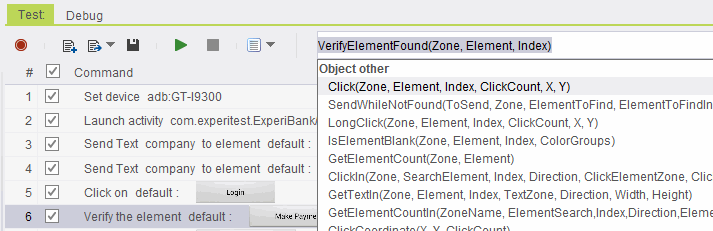
This is the new script:
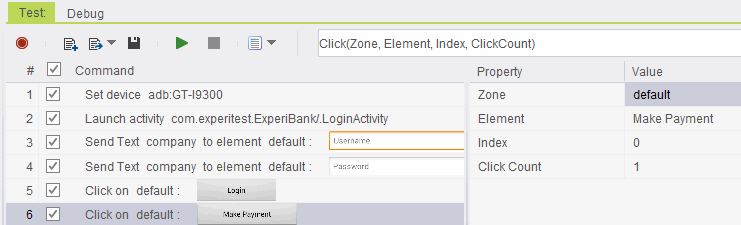
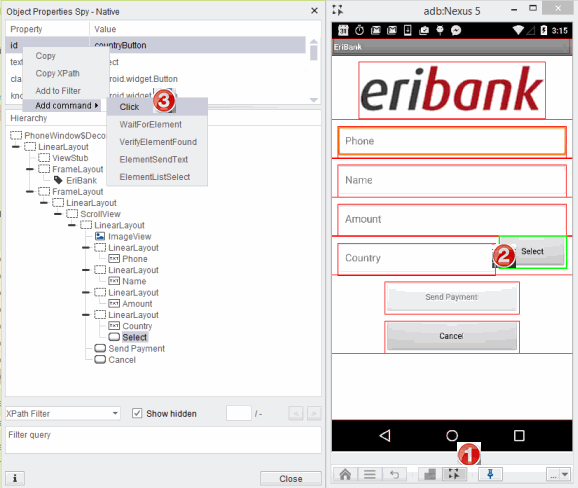
Step 3: Add a step - Click on 'Select' button (to open the countries list)
Note: We will do a dynamic NATIVE extraction
-
Click on the "Object Spy" icon button.
-
Click on the 'Select' button.
-
Right-click on one of the Object's properties to Add a command -> choose 'Click'.
The Countries list will now appear on the device and the script will appear in the script area:
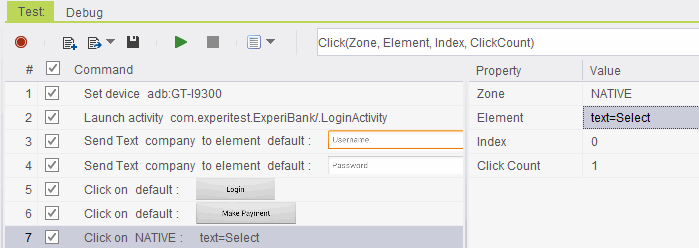
Now we are ready to add the command that will find the country we want and then click on it - the country will be United-Kingdom'
-
"SwipeWhileNotFound" command
-
"ElementListSelect" command